Settings
Browser PLAY: coast
Experiments | Drag the cockpit wheel to steer, red throttle up/down for ahead/astern, or scenery to look. Click AHEAD / N / ASTERN or the power scale; release at neutral before reversing a drag. Both engines move together. Expand Drive below for optional accessible sliders. Arrows helm (Up/Down throttle, Left/Right wheel), WASD look, N neutral, C or the top-bar button cockpit/outside view, R reset look, L navigation lights, H panel, Space pause. Effects are switched below.
Starting...
Slow graphics? Check browser and GPU settings
The GPU line above shows the adapter this demo is actually using. Low FPS alone does not prove that acceleration is disabled. A browser cannot reliably list every GPU installed in your PC or switch to another one for you.
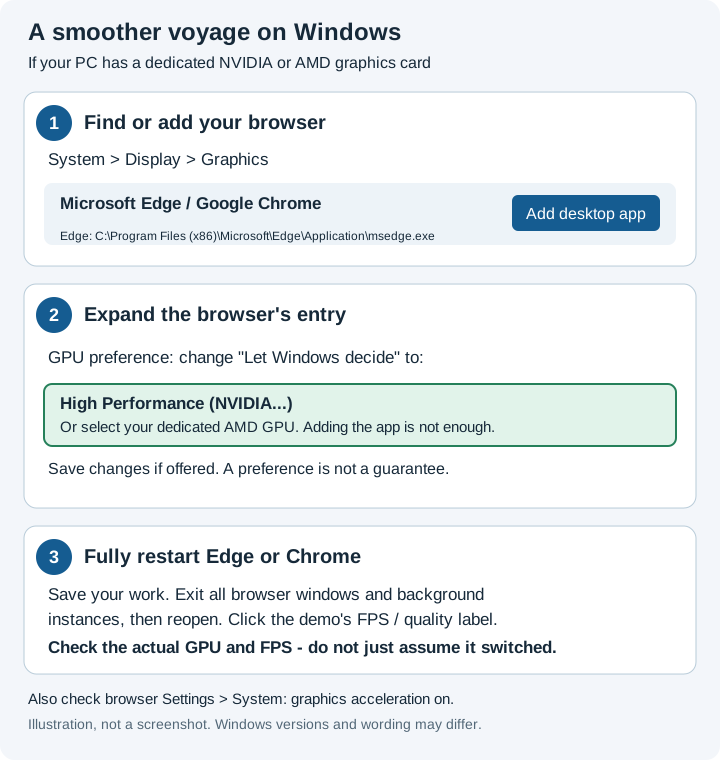
Your browser may ask permission to open Settings. If the button does nothing,
press Windows+R, enter ms-settings:display-advancedgraphics, and press Enter.
- Add your browser if missing. Choose Add desktop app.
For Edge, select
C:\Program Files (x86)\Microsoft\Edge\Application\msedge.exe. - Choose its GPU. Find your browser, then expand its entry. Under GPU preference, change Let Windows decide to High Performance (NVIDIA...) or the option naming your dedicated AMD GPU. Adding the browser alone is not enough.
- Restart and check. Save your work, fully close the browser (including background instances), then reopen it. Check the demo's GPU line and FPS.
Paths and labels may vary. Open edge://version or
chrome://version in a new tab to find its Executable Path.
This opens Settings only; it cannot add the browser or change a preference for you.
- Compare at Basic quality, with the same window size and weather. Keep this tab visible, connect laptop power, and close other graphics-heavy applications.
- In Edge, open
edge://settings/systemin a new tab. In Chrome, openchrome://settings/system. Enable graphics acceleration when available, then restart the browser if requested. - Check
edge://gpuorchrome://gpu. Look for hardware-accelerated WebGL/WebGPU. Hardware acceleration can still use integrated Intel graphics rather than a dedicated NVIDIA/AMD GPU.
If it is still slow, share the GPU line, quality, rendering size and FPS. Choose a lower quality or smaller window. On phones/tablets, graphics support, memory, heat and battery-saving limits vary; desktop GPU-selection steps do not apply. Do not disable browser security features or change experimental flags.
Daylight clock
Sound
Sound is off until enabled. You can continue without sound.
Performance monitor: warming up.
Quality selection and assessment
Assessment samples three views of your current voyage (~21 s, up to 45 s with shader warm-up). Simulation continues; camera is restored afterwards. Input, pause, resize or switching tabs cancels it.
Not assessed. Basic is the conservative default; higher tiers require measurement.
Changing quality reloads the scene and resets the voyage. Results apply only to sampled views, effects and resolution; retest after changes. Optional fog is not enabled by these results.
↑↓ throttle · ←→ wheel · WASD look · N neutral · R reset look · C view · L nav lights · H this panel · Space pause